VIGIL FOR macOS
Inspect app telemetry
on macOS with
read-only MCP.
Review Sentry exceptions, Vercel runtime logs, AI Gateway records, GitHub security findings, and TestFlight crashes on macOS, with a read-only MCP server for compatible coding agents.
Request Mac access
macOS 15+ · Apple silicon & Intel
Signed and notarized · Version 0.1.0
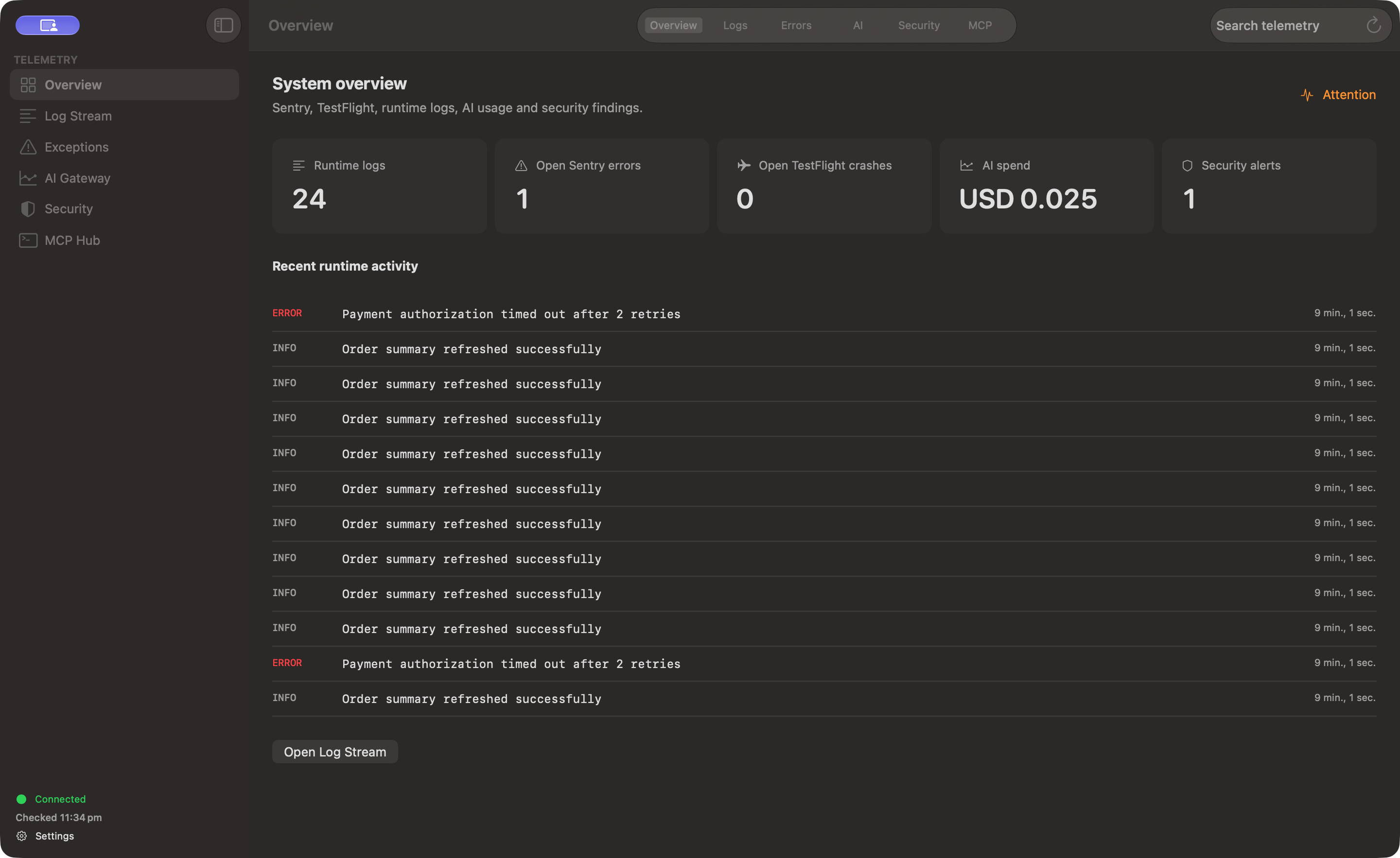
The screenshot could not load. Select its tab to retry, or read the setup guide.
Bring the context you already collect.
Five operational signal sources in one Mac window
Search and filter Sentry stack traces, Vercel runtime logs, AI Gateway token, latency, and cost records, GitHub Dependabot, CodeQL, and secret-scanning alerts, plus locally cached TestFlight crash reports.
Scoped keys, bounded queries, and credential redaction
Enforce scoped API keys, bounded record queries, and chunked details so large stack traces and logs fit agent context windows with recognized credentials redacted before records return.
Read-only MCP context for compatible coding agents
Serve 14 read-only tools across seven persisted datasets, local cache, and loaded snapshots through Vigil's private MCP server, giving coding agents structured context without production write access.
Connect an MCP client →query_stored_records({
"dataset": "logs",
"storage": "api",
"filters": {
"projectId": "demo-juniper-api",
"level": "error"
},
"limit": 25
})Structured records. Bounded reads. Credential redaction.
BRING YOUR OWN ENDPOINT
What you need to run Vigil
Vigil's self-hosted API includes automated provider collectors and webhook handlers. Prepare the components you plan to use before requesting access.
Read the API & MCP setup documentation →-
A Vigil API endpoint
For centralized telemetry, connect the Mac app to an API you or your team operate. Managed hosting is not included.
-
Node.js for MCP
Use the downloadable MCP package and a local Node.js installation to connect compatible coding agents.
-
ASC for optional TestFlight collection
Optional crash collection uses the App Store Connect CLI and your authorized Keychain profile.
A few useful details.
Is there a hosted Vigil cloud service?
No. Vigil's self-hosted API includes automated provider collectors and webhook ingestion, but you deploy and operate that endpoint yourself. Managed hosting is not included.
Does Vigil automatically fix bugs or modify my repositories?
No. Vigil does not automatically fix repositories. Its MCP tools expose read-only context. Its Mac interface lets you filter and inspect telemetry, and its MCP server provides 14 read-only tools so compatible coding agents can inspect logs, crashes, traces, and findings while you direct changes in your own editor or agent client.
Where is my telemetry data stored?
Vigil displays records from the API endpoint you configure and stores local cache data and connection secrets on your Mac. You choose which Vigil API endpoint and which local MCP clients to connect.
How is Vigil distributed right now?
The Developer ID signed, Apple-notarized universal developer preview is available by request for macOS 15+. Contact the developer for the app, local MCP package and guidance on deploying your own API.
Inspect your signals. Share the context.
Request Mac accessmacOS 15+ · Requires a configured Vigil API